Overview
New Project Wizard
Export Wizard
Settings
Purchase and Support
Additional Actions
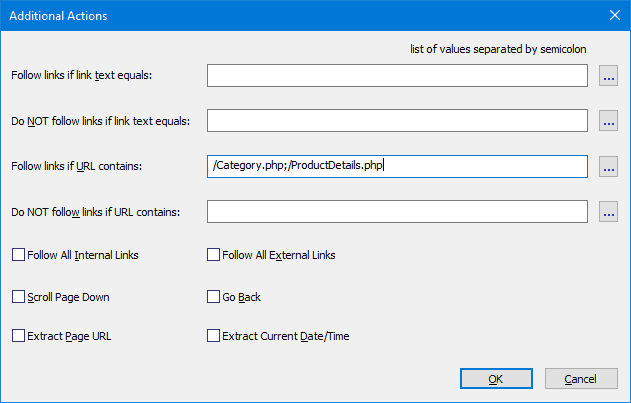
Additional actions allow you to define the link patterns the program will follow or ignore. If a page contains many links or links are located in different positions on different pages, it is difficult or impossible to use the base scraper actions so you have to use Additional Actions in these cases. You can configure the following actions:
| Actions Type | Description & Examples |
|---|---|
| Follow links if link text equals |
If the link text matches the pattern, the program will follow this link.
Examples:
• Pattern: "Next" → Follows links with exact text "Next" • Pattern: "Next*" * = any sequence → Follows links starting with "Next" ("Next >", "Next Page") • Pattern: "*Next*" → Follows links containing "Next" ("Go To Next Page") |
| Do NOT follow links if link text equals |
If the link text matches the pattern, the program will not follow this link.
Examples:
• Pattern: "Last" → Skips links with exact text "Last" • Pattern: "Last*" * = any sequence → Skips links starting with "Last" • Pattern: "*Last*" → Skips links containing "Last" |
| Follow links if URL contains |
If the link URL contains the pattern, the program will follow this link.
Example:
• Pattern: "ProductDetails.php" → Follows links like: http://www.domain.com/ProductDetails.php?id=1http://www.domain.com/ProductDetails.php?id=2
|
| Do NOT follow links if URL contains |
If the link URL contains the pattern, the program will not follow this link.
Example:
• Pattern: "&print=" → Skips links like: http://www.domain.com/ProductDetails.php?id=1&print=1http://www.domain.com/ProductDetails.php?id=2&print=1
|
| Follow All Internal Links |
The program will follow all links with the same domain as the current page.
Example:
• Current page: https://example.com/products• Follows: https://example.com/about, https://example.com/contact• Skips: https://othersite.com/page
|
| Follow All External Links |
The program will follow all links with domains different from the current page's domain.
Example:
• Current page: https://example.com/products• Follows: https://othersite.com/page, https://another.com/data• Skips: https://example.com/about
|
It is recommended to use the first two types of actions for links whose text remains the same on different pages. For example, Next, More, Details, etc. It is recommended to use the other two types of rules if the necessary links have some common part in their URLs (to see the URL of a link, move the mouse pointer over it and the URL will appear in the status bar at the bottom of the browser window).
For example, for the following links you can configure the action: "Follow links if URL contains: /Category.php;/ProductDetails.php":
- http://www.domain.com/Category.php?id=1,
- http://www.domain.com/Category.php?id=2,
- http://www.domain.com/ProductDetails.php?id=1,
- http://www.domain.com/ProductDetails.php?id=2,
- http://www.domain.com/ProductDetails.php?id=3,
For the following links you can configure the action: "Follow links if URL contains: /artist/".:
- http://rateyourmusic.com/artist/the_beatles,
- http://rateyourmusic.com/artist/radiohead,
You can type the patterns manually (separating them with a semicolon) or select them from the list generated by the program, but this list includes not all possible patterns but only the most obvious ones. To select patterns from the list, click the "Edit"  button and after the page is loaded in the new window click one of its links. If the list contains the corresponding pattern, its checkbox will become selected and all links corresponding to this pattern will be automatically highlighted. If the list does not contain the corresponding pattern, you should add it manually by clicking the "Add"
  button.
You can add the following actions to simulate the user behavior:
- Scroll Page Down - if this option is enabled, the program scrolls the page down to load dynamic content that appears on scroll (e.g., infinite scroll pages, 'Load More' sections).
- Go Back - if this option is enabled, the program simulates clicking the browser's back button, navigating to the previous page in history.
You can add the following actions to extract specific data:
- Page URL - if this option is enabled, the program extracts the current page URL.
- Current Date/Time - if this option is enabled, the program extracts the current datetime.